Service Autocomplete
netbobr includes a built-in database of 217 service entries (on 216 ports) that powers autocomplete in the port fields of the Manual Entry tab. CSV import does not use autocomplete: the CSV port column must contain port numbers.
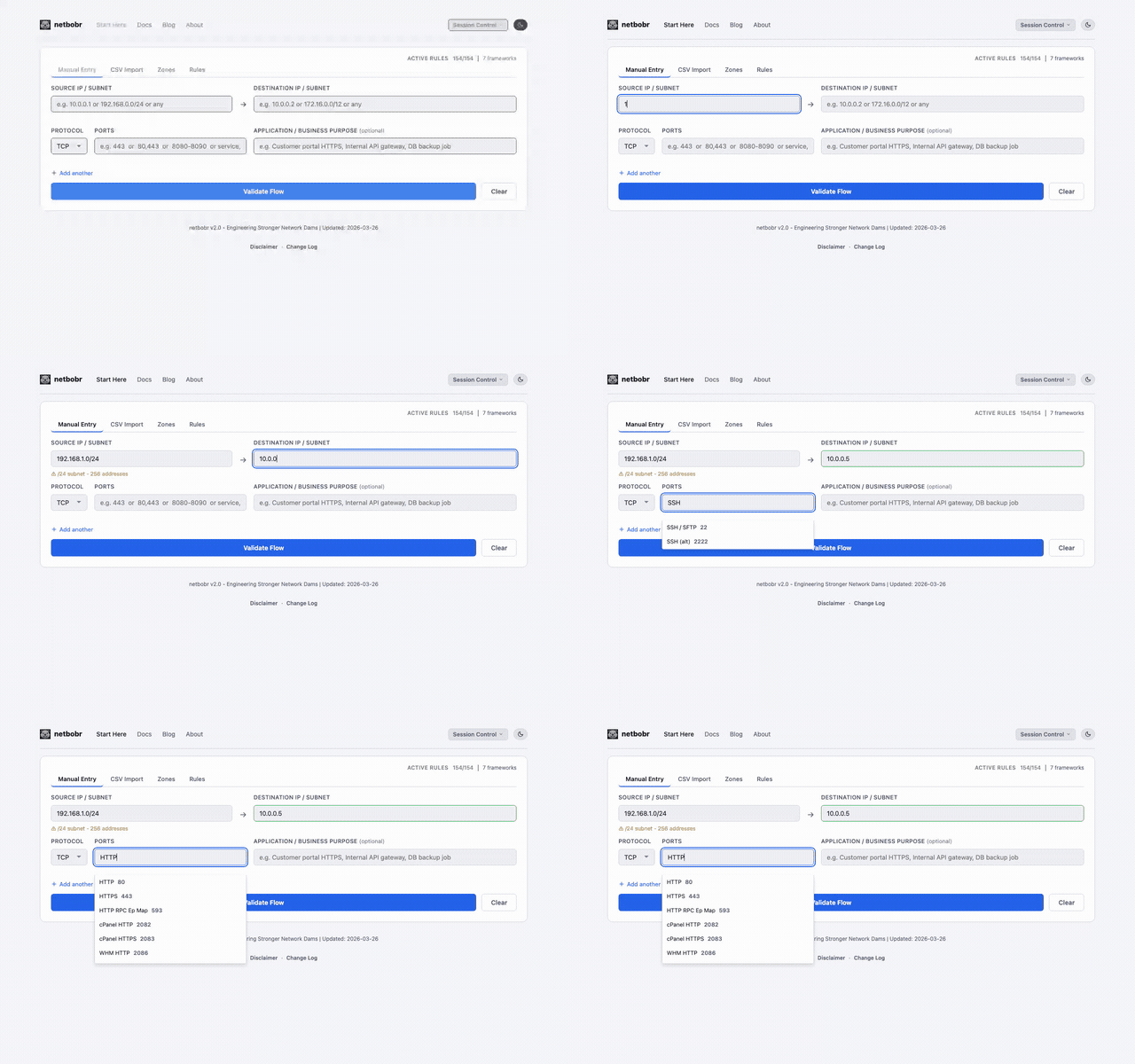
How it works
- Start typing a service name in a flow's port field on the Manual Entry tab.
- Suggestions appear as you type. Each shows the service name, its port and its protocol (for example
Syslog 514 UDP). - Select a service with the mouse or the arrow keys and Enter. The port number is filled in, and the protocol is set as described in Protocol selection.
Matching
Matching is a case-insensitive substring search on the service name. At most 10 suggestions are shown, sorted by port number.
| You type | Suggestions |
|---|---|
SSH | SSH / SFTP (22 TCP), SSH (alt) (2222 TCP) |
HTTPS | HTTPS (443 TCP), cPanel HTTPS (2083 TCP), WHM HTTPS (2087 TCP), Alt-HTTPS (4443 TCP), WinRM HTTPS (5986 TCP), HTTPS-alt (8443 TCP) |
SQL | MSSQL (1433 TCP), MSSQL Browser (1434 UDP), MySQL / MariaDB (3306 TCP), PostgreSQL (5432 TCP) |
DNS | DNS (53 TCP/UDP, one entry), DNS over TLS (853 TCP), mDNS (5353 UDP) |
syslog | Syslog (514 UDP), Syslog/TLS (6514 TCP) |
RDP | RDP (3389 TCP) |
Protocol selection
Selecting a service never widens the protocol to Any:
- Single-protocol services (TCP or UDP) set the flow's protocol to that value. Picking Syslog sets UDP; picking SSH sets TCP.
- Dual-protocol services (TCP/UDP, such as DNS or Kerberos) keep the protocol you already selected, so you can scope the rule to TCP or UDP yourself.
Risk levels and advisories
Each service entry has a risk level and advisory text:
| Risk Level | Meaning | Examples |
|---|---|---|
| LOW | Generally safe, commonly allowed | HTTPS (443), SMTPS (465) |
| MEDIUM | Acceptable in controlled environments | SSH (22), SMTP (25), DNS (53) |
| HIGH | Should be restricted or monitored | FTP (21), TFTP (69), RDP (3389) |
| CRITICAL | Rarely appropriate in production | Telnet (23), Redis (6379) |
The risk level is not shown in the dropdown. It appears on the Port / Application Match card of the validation result and in the port_risk column of the CSV export, and it feeds the Port Exposure factor of the risk score. The full list is in the Port & Service Database.
Numeric passthrough
If you type a port number directly (e.g., 443 or 8080), the field accepts it as-is without triggering autocomplete. This lets you enter custom or non-standard ports that are not in the service database.