Zone Management
Security zones let you model your network topology and define traffic policies between zones. When zones are active, validation results include zone badges and the zone-to-zone policy contributes to each flow's risk score.
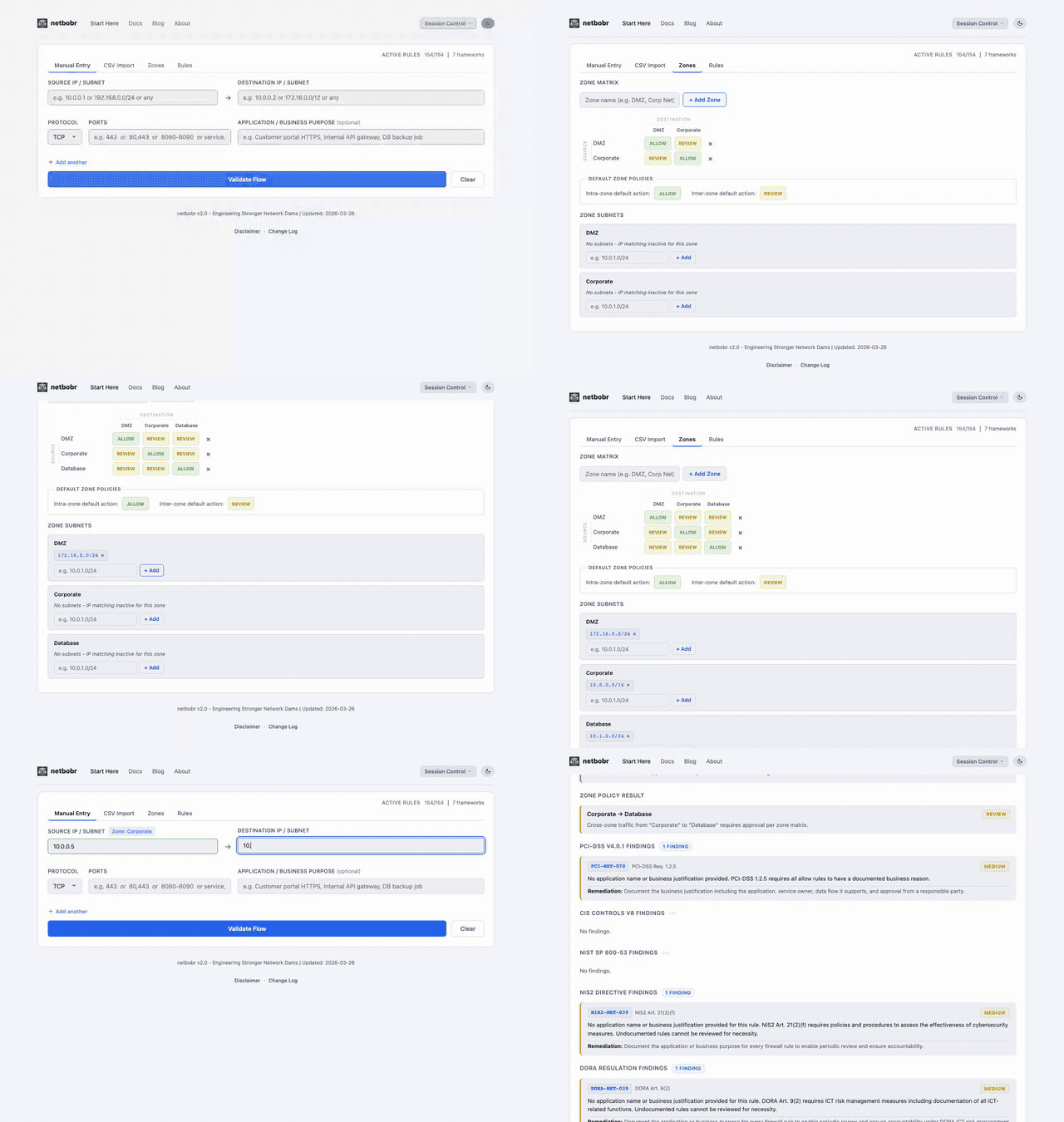
Defining zones
Create up to 10 security zones on the Zones tab. Each zone has:
- Name - alphanumeric, maximum 20 characters (e.g.,
DMZ,Corporate,Database,Management) - CIDR subnets - one or more subnets assigned to the zone
When a flow is validated, netbobr resolves each IP to a zone using longest-prefix matching. If an IP falls within multiple zone subnets, the most specific (longest prefix) match wins.
Zone-to-zone policy matrix
The policy matrix defines the default traffic posture between every pair of zones. Each cell has three states:
| Policy | Meaning | Risk impact |
|---|---|---|
| Allow | Traffic between these zones is expected | Lowest risk contribution |
| Review | Traffic may be legitimate but requires scrutiny | Moderate risk contribution |
| Deny | Traffic between these zones should not exist | Highest risk contribution |
Default policies:
- Same-zone traffic - Allow
- Inter-zone traffic - Review
Adjust policies by clicking cells in the matrix to cycle through Allow, Review, and Deny.
Example topology
The following diagram illustrates a typical four-zone layout with directional policies:
0.0.0.0/0] -->|Review| DMZ[DMZ
172.16.0.0/24] DMZ -->|Review| Corporate[Corporate
10.0.0.0/16] Corporate -->|Review| Database[Database
10.1.0.0/24] Internet -.->|Deny| Corporate Internet -.->|Deny| Database DMZ -.->|Deny| Database
Solid arrows represent Review policies where traffic may be legitimate. Dashed arrows represent Deny policies where traffic should not occur.
Zone configuration sharing
Zone configurations can be exported and imported as CSV files for team sharing:
- Export - downloads a CSV containing zone names, assigned subnets, and the full policy matrix.
- Import - loads a previously exported CSV, replacing the current zone configuration.
This makes it straightforward to maintain a single zone definition across a team or share configurations between environments.
Impact on validation
When zones are active:
- Zone badges appear on source and destination fields in both manual and CSV results.
- Zone policy feeds into the composite risk score via the Zone Policy weight factor. See Risk Score Weights for details on tuning the contribution.
- Zone attributes provide additional metadata (classification, environment, compliance scope, data sensitivity). See Zone Attributes for details.